
I’m totally addicted to Sweden’s public service radio, especially the SR P1 channel that is almost always flowing from our speakers at home. Programs that I miss, I catch up with via the excellent collection of SR podcasts.
When I recently decided to refresh my knowledge in AngularJS, I was looking for a ready-to-use backend for my front-end experiments. It turned out that Swedish Radio has a very nice REST API that is free to use! There is documentation available and also a forum.
My first test was to fetch all radio channels’ meta data, list the channels and their logotypes and provide links to the live broadcast url:s. You can view my published experiment in Plunker here:
http://run.plnkr.co/plunks/ogfyjJ/
It should look something like this:
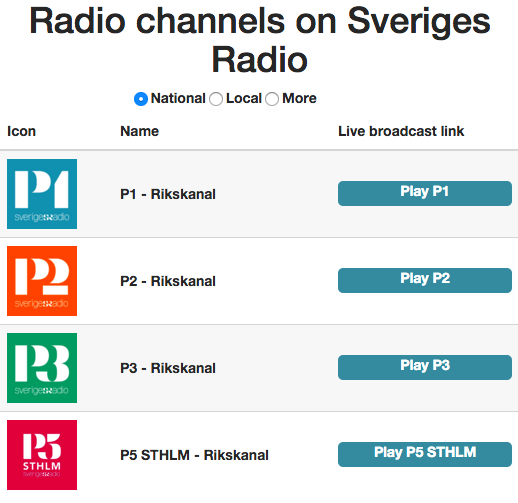
There are three radio buttons that you can use to filter among different types of channels. About the code, there is not much needed in the controller:
| var myApp = angular.module('myApp', []); | |
| myApp.controller('SRChannelsController', ['$scope', '$http', function($scope, $http) { | |
| $scope.header = 'Radio channels on Sveriges Radio'; | |
| $scope.filter = "Riks"; | |
| $scope.filterChanged = function() { | |
| getChannelsInfo($scope.filter); | |
| }; | |
| getChannelsInfo = function(filter) { | |
| var promise = $http.get("http://api.sr.se/api/v2/channels/?format=json&pagination=false&filter=channel.channeltype&filtervalue=" + filter); | |
| promise.then(function(response) { | |
| var channels = response.data.channels; | |
| $scope.channels = channels; | |
| }); | |
| }; | |
| getChannelsInfo($scope.filter); | |
| }]); |
And then, to display the data in the view:
| <!DOCTYPE html> | |
| <html ng-app="myApp"> | |
| <head> | |
| <script data-require="angular.js@1.4.8" data-semver="1.4.8" src="https://code.angularjs.org/1.4.8/angular.js"></script> | |
| <link rel="stylesheet" href="https://maxcdn.bootstrapcdn.com/bootstrap/3.3.6/css/bootstrap.css" /> | |
| <script src="SRController.js"></script> | |
| <link rel="stylesheet" href="style.css" /> | |
| </head> | |
| <body> | |
| <div ng-controller="SRChannelsController"> | |
| <h1>{{ header }}</h1> | |
| </div> | |
| <div> | |
| <form name="myForm" ng-controller="SRChannelsController"> | |
| <label> | |
| <input type="radio" ng-model="filter" value="Riks" ng-change="filterChanged()"> National | |
| </label> | |
| <label> | |
| <input type="radio" ng-model="filter" value="Lokal" ng-change="filterChanged()"> Local | |
| </label> | |
| <label> | |
| <input type="radio" ng-model="filter" value="Fler" ng-change="filterChanged()"> More | |
| </label> | |
| </form> | |
| </div> | |
| <div ng-controller="SRChannelsController"> | |
| <table class="table table-striped"> | |
| <thead> | |
| <tr> | |
| <th>Icon</th> | |
| <th>Name</th> | |
| <th>Live broadcast link</th> | |
| </tr> | |
| </thead> | |
| <tbody> | |
| <tr ng-repeat="item in channels"> | |
| <td class="vert-align"> | |
| <img ng-src={{item.image}} height="70" width="70"> | |
| </td> | |
| <td class="vert-align"> | |
| <b>{{item.name}} - {{item.channeltype}}</b> | |
| </td> | |
| <td class="vert-align"> | |
| <a href={{item.liveaudio.url}} type="audio/mpeg" class="playbutton">Play {{item.name}}</a> | |
| </td> | |
| </tr> | |
| </tbody> | |
| </table> | |
| </div> | |
| </body> | |
| </html> |


